
Best Recordly Alternatives in September 2026: Why Users Are Switching
Recordly is stalled in September 2026: its lead developer is unreachable, donated funds are locked, and Mac builds are unsigned. Why trust matters for screen recording permissions, and how ScreenKite, Cap, OpenScreen, and OBS compare.
Best Recordly Alternatives in September 2026: Why Users Are Switching
When Recordly first surfaced on GitHub, it promised a tempting idea: a free, open-source alternative to Screen Studio with automated zoom, smooth cursor tracking, and polished presentation frames under an AGPL 3.0 license.
Then you tried to run it on your Mac.
First came Apple's Gatekeeper warning: "Recordly cannot be opened because Apple cannot check it for malicious software." Getting past it meant weakening your Mac's security settings, and after that, support depended on a small volunteer team.
In September 2026, the situation has not improved. What supporters hoped was a brief maintenance pause has turned into a stalled project.
If you produce product demos, engineering walkthroughs, customer tutorials, or marketing videos, you need software you can count on at the export screen and that opens without system warnings. This September 2026 guide covers where Recordly stands, why trust matters when you grant screen recording permissions, and the best alternatives available today.
ScreenKite is a native screen recorder and complete video editor. It combines cinematic auto-zoom with full timeline editing and AI agent editing in one app. ScreenKite ships native macOS and a native Windows Beta. It is free to use with a watermark on exports, and a one-time Pro purchase removes it. Download ScreenKite → Need share links hosted on your own infrastructure? ScreenKite Enterprise →
The Reality of Recordly in September 2026
At the end of July 2026, the active maintainers of Recordly posted an urgent announcement in their Discord community acknowledging that the project had hit an operational dead end:
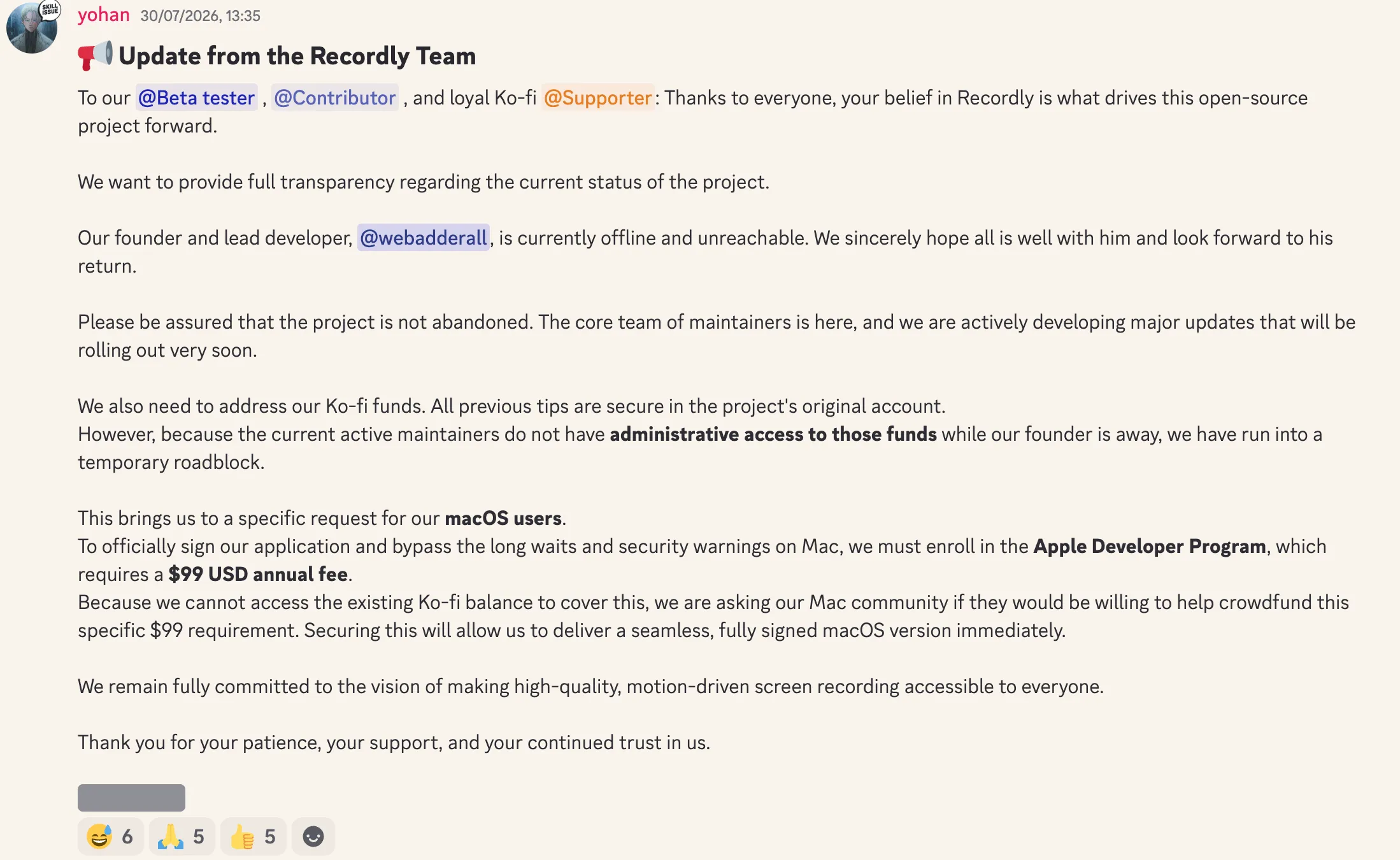
Official Update from Recordly Maintainers:
"Our founder and lead developer, @webadderall, is currently offline and unreachable. We sincerely hope all is well with him and look forward to his return...
We also need to address our Ko-fi funds. All previous tips are secure in the project's original account. However, because the current active maintainers do not have administrative access to those funds while our founder is away, we have run into a temporary roadblock.
This brings us to a specific request for our macOS users. To officially sign our application and bypass the long waits and security warnings on Mac, we must enroll in the Apple Developer Program, which requires a $99 USD annual fee. Because we cannot access the existing Ko-fi balance to cover this, we are asking our Mac community if they would be willing to help crowdfund this specific $99 requirement."
Over a month later, in September 2026, here is where the project stands:
- Unsigned macOS builds. Without Apple Developer Program enrollment, Recordly cannot sign its Mac app. Every Mac user who installs it has to override Gatekeeper.
- An unreachable lead developer and locked funds. By the maintainers' own account, the founder is offline and the remaining team has no administrative access to the project's donations.
- No clear timeline. With the lead developer away, there is no public date for signed builds or the next release.
Why Trust Matters for Screen Recording Software
There is an uncomfortable truth many creators overlook: screen recording software is one of the most privileged tools on your computer.
To capture your screen, a recorder like Recordly asks for:
- Screen Recording permission: the ability to capture every pixel on your displays.
- Accessibility permission: the ability to follow global mouse and keyboard events.
- System audio capture: the ability to record the audio output of your apps.
Think about what appears on your screen during a normal workday:
- Customer data, revenue dashboards, and banking portals.
- Source code, pull requests, and unreleased product roadmaps.
- Private messages, password managers, and confidential emails.
When you install a screen recorder, you hand that software visual access to your company's work and your personal life.
Granting those rights to an unsigned app whose lead developer is unreachable is a real risk. In operational terms, this is a bus factor of 1: when one person holds the keys, the whole project stalls when that person is away.
Professional work deserves professional accountability. You would not run your company's accounting on an unsigned app from a project with no active owner. Your screen recorder deserves the same standard.
The Top Alternative: ScreenKite
ScreenKite is the natural next step for professionals leaving Recordly.
ScreenKite is signed and notarized by Apple. It opens cleanly on macOS, with no Gatekeeper warnings and no security workarounds. ScreenKite ships native macOS and a native Windows Beta.
Beyond Recording: A Complete Studio Editor
Recordly focused on auto-zoom. When you stumbled over a sentence or needed to rearrange clips, you had to move your raw capture into a separate editor.
ScreenKite puts a full video editor right inside the recorder:
- Transcript-based cuts. ScreenKite transcribes your audio with built-in transcription. Delete an awkward phrase or filler word from the transcript, and the matching video and audio are trimmed automatically.
- Agent editing. Use plain-language prompts with Claude Code, ChatGPT Codex, Antigravity, Grok Build, or Kimi to make cuts, add zoom highlights, generate captions, or adjust framing without manual keyframing.
- Your recordings stay yours. Projects are saved on your own disk. When you want a share link, you choose where it is hosted: your own Google Drive, Dropbox, or OneDrive.
- Lightning fast. Export is lightning fast, in our tests and in user feedback.
- Clear pricing. ScreenKite is free to use with a watermark on exports, and a one-time Pro purchase removes it. Pro is $79.99 for 3 devices at the founder price until 2026-10-31, then $99.99. No subscription.
Any downsides? The only downside is there's almost no downside. We're video creators ourselves, so we know exactly what you need.
ScreenKite runs natively on macOS and ships a native Windows Beta. Creators and teams choose it for fast local exports and timeline editing with the AI agent they already use: Claude Code, ChatGPT Codex, Antigravity, Grok Build or Kimi. Describe the cut, and the agent does the trims.
Other Open-Source Alternatives
If your organization requires open-source software, several other projects are worth knowing. Here is how they compare with ScreenKite.
1. Cap
Cap is an open-source screen recorder with an Instant Mode for quick share links and a Studio Mode for local editing, including zooms generated from recorded clicks. It is free for personal use, with paid plans (pricing).
ScreenKite adds AI agent editing with the agent you already use, transcript-based cuts, and a dedicated team focused on polished demos.
2. OpenScreen
OpenScreen is a free, MIT-licensed recorder that continues an earlier GitHub project under new maintainers. It offers automatic zooms and on-device captions. The project describes itself as under active development and warns users to "expect rough edges and occasional breaking changes."
ScreenKite gives you the same category of polish from a product with a dedicated team and stable releases.
3. OBS Studio
OBS Studio is the standard for open-source streaming and recording, backed by an established community.
OBS is designed for live broadcasting and scene switching, not product demos. It has no automatic cursor zoom and no built-in demo editing; a Screen Studio-style result takes scripts, manual pan and crop filters, and a separate editor. ScreenKite gives you that result out of the box.
Comparison Matrix
| Capability | ScreenKite | Recordly (Sept 2026) | Cap | OpenScreen |
|---|---|---|---|---|
| Project status | Dedicated team | Stalled (lead developer unreachable, funds locked) | Active | Active development |
| Signed Mac app | Yes, signed and notarized by Apple | No (Gatekeeper warning) | — | — |
| Auto-zoom | Yes, cinematic | Yes | Yes (from clicks, Studio Mode) | Yes (from clicks) |
| Transcript-based cuts | Yes (built-in transcription) | No | Captions | Yes |
| AI agent editing | Yes (Claude Code, ChatGPT Codex, Antigravity, Grok Build, Kimi) | No | — | AI assistant with your own API key |
| Full timeline editor | Yes | No | Yes | Yes |
| Export | Lightning fast, in our tests and in user feedback | — | — | — |
| Pricing | Free with a watermark on exports; one-time Pro purchase removes it | Free (AGPL); crowdfunding the Apple developer fee | Free for personal use; paid plans (pricing) | Free (MIT) |
Also read
- ScreenKite vs Recordly: Native macOS Recorder vs Open-Source Cross-Platform Alternative
- ScreenKite vs ScreenCharm: Why Native Beats Electron for Screen Recording
- ScreenKite vs OpenScreen: Native macOS Recorder vs Open-Source Electron App
- ScreenKite vs Kap: Native Recorder vs Open-Source GIF Tool
- Native vs Electron Screen Recorders: What It Means for Your Recordings
- Best Recordly Alternatives in August 2026: Why Users Are Switching
Conclusion
Recordly's situation shows the risk of relying on an unmaintained project for important work. When a tool needs deep access to your entire screen and keyboard, an unsigned app whose lead developer is unreachable is a risk you do not need to take.
Your product demos and tutorials represent your company's craft. They deserve software that opens without security warnings and is backed by a team that ships.
With Apple signing, lightning-fast exports, automatic zoom, transcript-based cutting, AI agent editing, and a full timeline editor, ScreenKite is the reliable, professional choice. It is free to use with a watermark on exports, and a one-time Pro purchase removes it.
Founder of ScreenKite. Mike records product demos and lessons on a Mac, and builds the recorder and editor he wanted for that work.
www.screenkite.comRelated articles
Recordly Stars vs Maturity: Why Screen Recording Needs a Serious Product
Recordly has about 28.5k GitHub stars, but public maintainer posts and a thick issue backlog show school interruptions and export, audio, and permission failures. Stars are not maturity. ScreenKite is the native Mac product for demos that ship.
ScreenKite vs Recordly: Native macOS Recorder vs Open-Source Cross-Platform Alternative
Comparing ScreenKite and Recordly in September 2026.
Best Recordly Alternatives in August 2026: Why Users Are Switching
Recordly is facing maintenance lockouts and unsigned Mac builds in August 2026. Here is why users are switching to ScreenKite and how the alternatives compare.