
Best Recordly Alternatives in August 2026: Why Users Are Switching
Recordly is facing maintenance lockouts and unsigned Mac builds in August 2026. Here is why users are switching to ScreenKite and how the alternatives compare.
Best Recordly Alternatives in August 2026: Why Users Are Switching
Recordly generated initial excitement on GitHub as a free, open-source alternative to Screen Studio. It promised auto-zoom, cursor smoothing, and frame styling under an AGPL 3.0 license.
However, as of August 2026, Recordly is practically unusable for serious work due to project governance breakdown, locked donation funds, unsigned macOS builds, and unaddressed stability bugs.
If you need a reliable screen recorder that just works without security warnings or export glitches, this guide explains why Recordly is stalled and why ScreenKite is the top choice for Mac users in August 2026.
September 2026 Update: Recordly's founder remains unreachable, builds remain unsigned, and funds are locked. Read our latest investigation, Discord evidence, and updated alternatives: Best Recordly Alternatives in September 2026 →
Why Recordly is unusable in August 2026
In August 2026, the active maintainers of Recordly issued an official announcement on their Discord community explaining severe operational roadblocks:
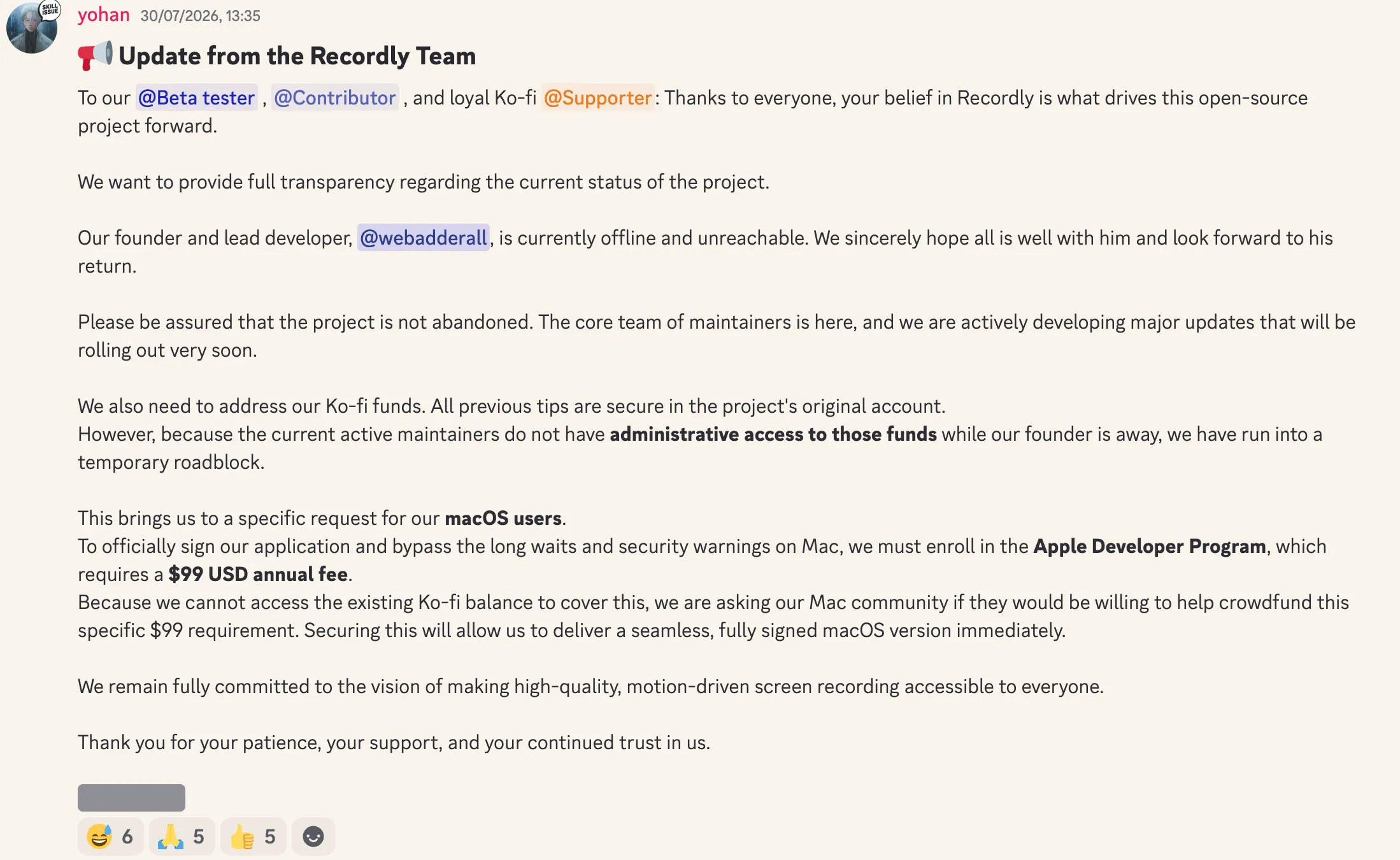
Official Update from Recordly Maintainers (August 2026):
"Our founder and lead developer is currently offline and unreachable... because the current active maintainers do not have administrative access to those [Ko-fi] funds while our founder is away, we have run into a temporary roadblock."
"To officially sign our application and bypass the long waits and security warnings on Mac, we must enroll in the Apple Developer Program, which requires a $99 USD annual fee. Because we cannot access the existing Ko-fi balance to cover this, we are asking our Mac community if they would be willing to help crowdfund this specific $99 requirement."
The key issues rendering Recordly unreliable include:
- Unsigned macOS app binaries. Because the maintainers cannot access Ko-fi donations to pay Apple's paid annual developer program fee, the app is distributed unsigned. Launching it on macOS triggers Gatekeeper security blocks and untrusted developer warnings.
- Founder disappearance and stranded funds. The founder (
webadderall) went offline and unreachable, locking all administrative access to project donation accounts. - Vibe-coding stability issues on GitHub. Rapid AI-assisted "vibe coding" without sustained code reviews or testing pipelines has left open GitHub issues filled with reports of crash loops, failed MP4 exports, memory leaks, and broken audio sync.
When recording client demos, tutorials, or product screencasts, relying on software that cannot export reliably or pass macOS security checks creates friction.
The Top Alternative: ScreenKite (The Best Screen Recorder & Video Editor in the World)
ScreenKite is our top pick for Mac users. Built 100% natively for macOS, It opens instantly without Gatekeeper warnings, code-signed and notarized by Apple.
Instead of just capturing pixels and forcing you to buy a second editing tool like Final Cut Pro or CapCut, ScreenKite is a complete studio editor built directly into the recorder. And with native AI integrations, coding agents like Claude Code, ChatGPT Codex, Antigravity, Grok Build, or Kimi can edit your videos for you.
ScreenKite exports lightning fast in our tests and in user feedback.
Key capabilities:
- Light and quick. A 100% native macOS app with quick exports, lightning fast in our tests and in user feedback. Zero Electron bloat.
- Complete built-in video editor. Full multi-track timeline editing with trim, cut, overlays, and captions. You never need a separate video editor.
- AI agent video editing. Describe what you want in natural language, and Claude Code, ChatGPT Codex, Antigravity, Grok Build, or Kimi will perform cuts, zooms, and captions for you.
- Transcription cut. Edit video by editing text transcripts. Deleting transcript lines removes the corresponding video and audio segments with millisecond precision.
- Signed & notarized. Enrolled in the official Apple Developer Program; zero Gatekeeper warnings on Mac.
- System audio capture. Native macOS capture audio routing without third-party virtual driver extensions.
- One-time purchase. Paid product with a transparent one-time purchase. No monthly subscription rent, and no cloud lock-in. Pro removes the free export watermark.
Any downsides? The only downside is there's almost no downside, because we're video creators ourselves and know what users need.
ScreenKite runs natively on macOS and ships a native Windows Beta. It's lightning fast, in our tests and in user feedback, and you edit on the timeline with the AI agent you already use: Claude Code, ChatGPT Codex, Antigravity, Grok Build or Kimi. Describe the cut, and the agent does the trims.
Other Open-Source Options: Cap.so
For users specifically looking for another open-source project, Cap.so is a lightweight open-source screen recorder.
However, Cap.so remains feature-limited compared to dedicated production tools. Its development focus has centered primarily on developer technology experimentation rather than solving practical user workflow pain points. As a result, it lacks core features like automatic cursor zoom, transcription-based video editing, and AI post-production cuts.
While Cap.so serves as an interesting open-source technical project, users looking to record polished product demos without manual editing overhead will find its feature set constrained.
Feature & Reliability Comparison
| Feature / Metric | ScreenKite | Recordly (Aug 2026) | Cap.so |
|---|---|---|---|
| macOS Security | Signed & Notarized | Unsigned (Gatekeeper Blocked) | Signed / Web-based |
| Maintenance Status | Active & Dedicated | Stalled / Locked Funds | Active Tech Sandbox |
| Auto-Zoom | Yes | Yes (Buggy / Crashes) | No |
| Export Acceleration | Lightning fast in our tests and in user feedback | Unpredictable / Crashes | Standard |
| Transcription Cut | Yes | No | No |
| AI Video Editing | Yes (Claude Code / ChatGPT Codex / Antigravity / Grok Build / Kimi) | No | No |
| Full Video Editor | Yes (Built-in FCP/CapCut class) | Basic Timeline | No |
| Price | One-time purchase | Free (Unsigned) | Free / Paid Tiers |
| Focus | User Product Demos & Speed | Open-Source Prototype | Tech Experimentation |
Also read
- ScreenKite vs Recordly: Native macOS Recorder vs Open-Source Alternative
- ScreenKite vs ScreenCharm: Why Native Beats Electron for Screen Recording
- ScreenKite vs OpenScreen: Native macOS Recorder vs Open-Source Electron App
- ScreenKite vs Kap: Native Recorder vs Open-Source GIF Tool
- Native vs Electron Screen Recorders: What It Means for Your Recordings
Conclusion
Recordly's August 2026 leadership disappearance, locked donation funds, unsigned Mac builds, and unaddressed GitHub crashes show the risks of relying on unmaintained hobbyist software for daily work.
If you are on macOS and want a light, capable screen recording experience with quick export, a complete built-in video editor, and AI agents that can edit for you, ScreenKite is a great choice.
Founder of ScreenKite. Mike records product demos and lessons on a Mac, and builds the recorder and editor he wanted for that work.
www.screenkite.comRelated articles
ScreenKite vs Recordly: Native macOS Recorder vs Open-Source Cross-Platform Alternative
Comparing ScreenKite and Recordly in September 2026.
Best Screen Studio Alternatives for Mac (2026): 5 Tools Compared
Compare the best Screen Studio alternatives for Mac in 2026, including ScreenKite, Screen Charm, Loom, OBS Studio, and Camtasia. See why ScreenKite stands out in export speed, AI editing, and value.
7 Best Free Screen Recorders for Mac in 2026
An honest comparison of every free screen recording app for Mac in 2026. What each one does well, where it falls short, and which one fits your workflow.