
Die besten Recordly-Alternativen im August 2026: Warum Nutzer wechseln
Recordly leidet im August 2026 unter Projektstillstand und unsignierten Mac-Builds. Erfahren Sie, warum Nutzer zu ScreenKite wechseln und wie die Alternativen im Vergleich abschneiden.
Die besten Recordly-Alternativen im August 2026: Warum Nutzer wechseln
Recordly stieß auf GitHub zunächst auf großes Interesse als kostenlose Open-Source-Alternative zu Screen Studio. Unter der AGPL-3.0-Lizenz versprach das Projekt automatischen Zoom, Cursor-Glättung und ansprechende Rahmen-Stile.
Seit August 2026 ist Recordly für den produktiven Einsatz jedoch praktisch unbrauchbar geworden: Grund dafür sind Probleme in der Projektführung, blockierte Spendengelder, unsignierte macOS-Builds und ungelöste Stabilitätsprobleme.
Wenn Sie einen zuverlässigen Bildschirmrekorder suchen, der ohne Sicherheitswarnungen oder Exportprobleme funktioniert, erfahren Sie in diesem Leitfaden, warum Recordly ins Stocken geraten ist und weshalb ScreenKite die beste Wahl für Mac-Nutzer im August 2026 darstellt.
Update September 2026: Der Gründer von Recordly ist weiterhin nicht erreichbar und Mac-Builds bleiben unsigniert. Lesen Sie unsere neueste Untersuchung mit Discord-Belegen: Beste Recordly-Alternativen im September 2026 →
Warum Recordly im August 2026 unbrauchbar ist
Im August 2026 veröffentlichten die aktiven Maintainer von Recordly eine offizielle Mitteilung auf ihrem Discord-Server, in der sie gravierende operative Hürden schilderten:
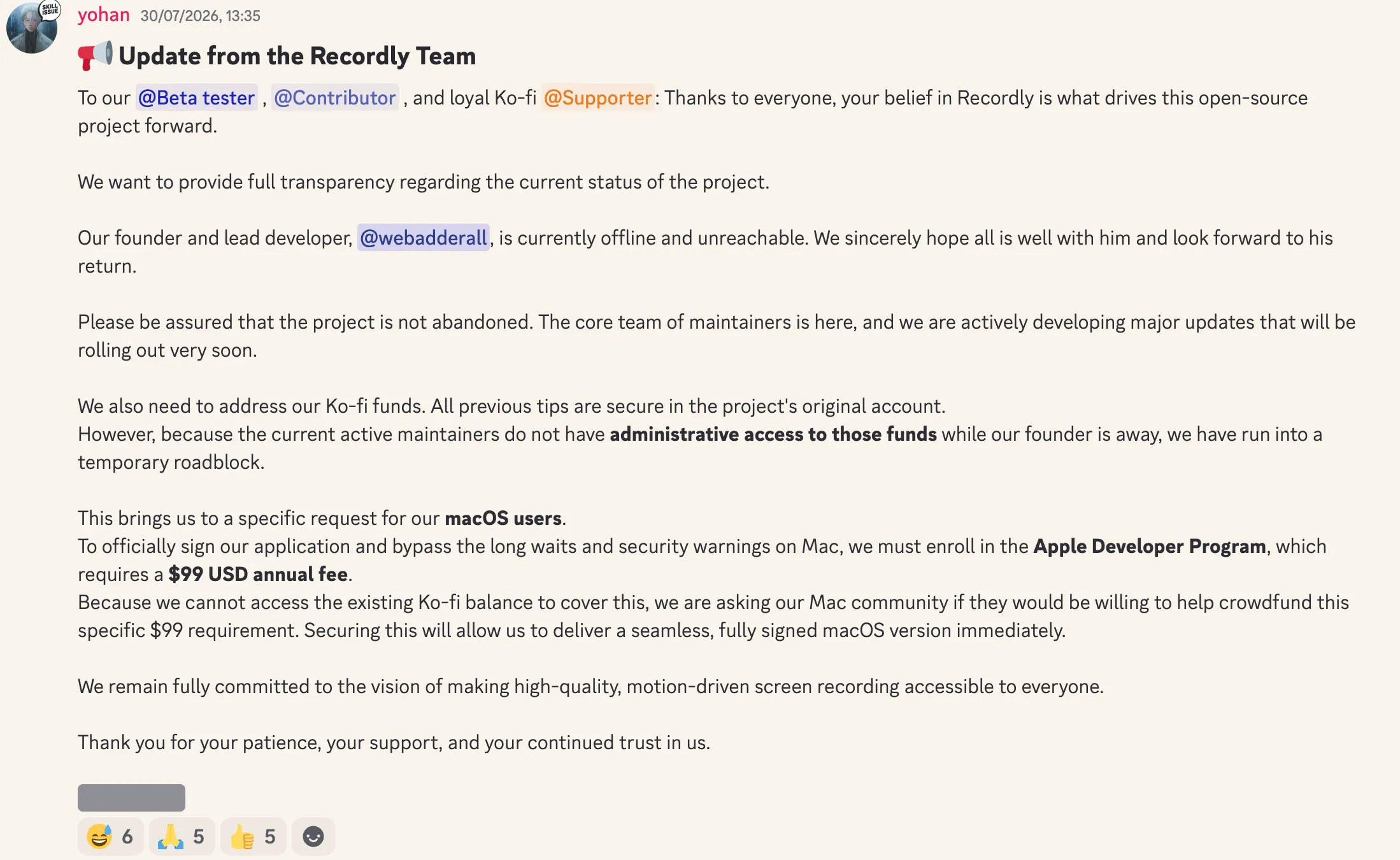
Offizielles Update der Recordly-Maintainer (August 2026):
„Unser Gründer und leitender Entwickler ist derzeit offline und nicht erreichbar... Da die aktuell aktiven Maintainer während seiner Abwesenheit keinen administrativen Zugriff auf die Spendengelder [auf Ko-fi] haben, stehen wir vor einer vorübergehenden Hürde.“
„Um unsere Anwendung offiziell zu signieren und die langen Wartezeiten sowie Sicherheitswarnungen auf dem Mac zu umgehen, müssen wir uns für das Apple Developer Program registrieren, wofür eine jährliche Gebühr von 99 USD anfällt. Da wir nicht auf das vorhandene Ko-fi-Guthaben zugreifen können, bitten wir unsere Mac-Community, ob sie bereit wäre, diese 99 USD durch Crowdfunding mitzufinanzieren.“
Die zentralen Probleme, die Recordly unzuverlässig machen:
- Unsignierte macOS-App-Binaries: Da die Maintainer nicht an die Ko-fi-Spenden gelangen, um Apples jährliche Entwicklerprogramm-Gebühr zu bezahlen, wird die App unsigniert verteilt. Das Starten unter macOS löst Gatekeeper-Sicherheitsblockaden und Warnungen vor nicht vertrauenswürdigen Entwicklern aus.
- Verschwinden des Gründers und blockierte Gelder: Der Gründer (
webadderall) ging offline und ist nicht mehr erreichbar, wodurch jeglicher administrative Zugriff auf die Spendenkonten des Projekts blockiert ist. - Stabilitätsprobleme durch „Vibe-Coding“ auf GitHub: Schnelles KI-gestütztes „Vibe-Coding“ ohne systematische Code-Reviews oder Test-Pipelines hat zu zahlreichen offenen GitHub-Issues geführt – von Absturzschleifen und fehlgeschlagenen MP4-Exporten bis hin zu Speicherlecks und asynchronem Ton.
Bei der Aufnahme von Kundendemos, Tutorials oder Produkt-Screencasts erzeugt eine Software, die nicht verlässlich exportiert oder an macOS-Sicherheitsprüfungen scheitert, ständige Reibungsverluste.
Die beste Alternative: ScreenKite (Der weltweit beste Mac-Bildschirmrekorder und Videoeditor)
ScreenKite ist unsere erste Wahl für Mac-Nutzer. Als 100 % native macOS-App ist ScreenKite die schlankste, schnellste und leistungsstärkste Bildschirmaufnahme- und Videoschnitt-Suite der Welt. Es öffnet sich sofort ohne Gatekeeper-Warnungen, da es von Apple offiziell codesigniert und notarisiert ist.
Im Gegensatz zu unfertigen Rekordern, die lediglich den Bildschirm aufnehmen und Sie danach zwingen, eine zweite Schnittsoftware wie Final Cut Pro oder CapCut zu kaufen, integriert ScreenKite direkt ein vollständiges Mehrspur-Videostudio. Über KI-Coding-Assistenten wie Claude Code, ChatGPT Codex, Antigravity, Grok Build oder Kimi können Sie Ihre Videos zudem mit einfachen Sprachbefehlen bearbeiten lassen.
ScreenKite exportiert blitzschnell, in unseren Tests und laut Nutzerfeedback.
Wichtigste Funktionen:
- Schlank und schnell: Eine 100 % native macOS-App mit schnellen Exporten, blitzschnell, in unseren Tests und laut Nutzerfeedback. Keine schwerfällige Electron-Laufzeit.
- Vollständiger integrierter Videoeditor: Mehrspur-Timeline mit Schnitt, dynamischem Auto-Zoom, Layout-Styling und Untertiteln. Kein separates Schnittprogramm erforderlich.
- KI-Agent-Videobearbeitung: Geben Sie Befehle in natürlicher Sprache ein; Claude Code, ChatGPT Codex, Antigravity, Grok Build oder Kimi setzen Schnitte, Zoom-Effekte und Untertitel automatisch um.
- Transkriptionsbasierter Schnitt: Bearbeiten Sie Videos direkt über Texttranskripte. Das Löschen von Textzeilen schneidet das Videosegment millisekundengenau heraus.
- Signiert & notarisiert: Offiziell im Apple Developer Program registriert; keinerlei Gatekeeper-Warnungen auf dem Mac.
- System-Audioaufnahme: Native Tonaufnahme über nativer macOS-Aufnahme ohne fehleranfällige virtuelle Treiber von Drittanbietern.
- Einmalkauf: Transparentes kommerzielles Modell mit unbefristeter Lizenz. Kein Monatsabo, keine Cloud-Abhängigkeit. Pro entfernt das Wasserzeichen im kostenlosen Export.
Irgendwelche Nachteile? Der einzige Nachteil ist, dass es fast keinen gibt, denn wir sind selbst Videocreator und wissen, was Nutzer brauchen.
ScreenKite läuft nativ auf macOS und bietet eine native Windows-Beta. Es ist blitzschnell, in unseren Tests und laut Nutzerfeedback, und du schneidest auf der Timeline mit dem KI-Agenten, den du schon nutzt: Claude Code, ChatGPT Codex, Antigravity, Grok Build oder Kimi. Beschreibe den Schnitt, der Agent übernimmt das Trimmen.
Weitere Open-Source-Optionen: Cap.so
Für Nutzer, die gezielt nach einem anderen Open-Source-Projekt suchen, ist Cap.so ein schlanker Open-Source-Bildschirmrekorder.
Im Vergleich zu professionellen Produktionstools bleibt der Funktionsumfang von Cap.so jedoch begrenzt. Der Schwerpunkt der Entwicklung lag bisher eher auf technologischen Experimenten als auf der Lösung konkreter Workflow-Probleme im Alltag. Daher fehlen Kernfunktionen wie automatischer Cursor-Zoom, transkriptionsbasierter Videoschnitt, und KI-Postproduktion.
Obwohl Cap.so ein interessantes technisches Open-Source-Projekt ist, erweist sich der Funktionsumfang für alle, die ansprechende Produktdemos ohne aufwendige manuelle Nachbearbeitung erstellen möchten, als zu stark eingeschränkt.
Vergleich von Funktionen und Zuverlässigkeit
| Funktion / Kriterium | ScreenKite | Recordly (Aug 2026) | Cap.so |
|---|---|---|---|
| macOS-Sicherheit | Signiert & Notarisiert | Unsigniert (Von Gatekeeper blockiert) | Signiert / Webbasiert |
| Wartungsstatus | Aktiv & kontinuierlich gepflegt | Stillstand / Blockierte Gelder | Aktives Tech-Experimentierfeld |
| Auto-Zoom | Ja | Ja (Fehlerhaft / Abstürze) | Nein |
| Export-Beschleunigung | Blitzschnell, in unseren Tests und laut Nutzerfeedback | Unberechenbar / Abstürze | Standard |
| Transkriptions-Schnitt | Ja | Nein | Nein |
| KI-Videobearbeitung | Ja (Claude Code / ChatGPT Codex / Antigravity / Grok Build / Kimi) | Nein | Nein |
| Vollständiger Videoeditor | Ja (Integriertes Mehrspur-Studio) | Nur rudimentäre Timeline | Nein |
| Preis | Einmalkauf | Kostenlos (Unsigniert) | Kostenlos / Bezahlte Tarife |
| Fokus | Professionelle Demos & Höchstgeschwindigkeit | Open-Source-Prototyp | Technologie-Experimente |
Auch lesenswert
- ScreenKite vs. Recordly: Nativer macOS-Rekorder vs. Open-Source-Alternative
- ScreenKite vs. ScreenCharm: Warum native Apps Electron bei der Bildschirmaufnahme überlegen sind
- ScreenKite vs. OpenScreen: Nativer macOS-Rekorder vs. Open-Source-Electron-App
- ScreenKite vs. Kap: Nativer Rekorder vs. Open-Source-GIF-Tool
- Native vs. Electron Bildschirmrecorder: Was das für Ihre Aufnahmen bedeutet
Fazit
Die Entwicklungen rund um Recordly im August 2026 – das Verschwinden des Gründers, blockierte Spendengelder, unsignierte Mac-Builds und ungelöste Abstürze auf GitHub – verdeutlichen die Risiken von nicht kontinuierlich gepflegter Hobby-Software für den täglichen Arbeitseinsatz.
Wenn Sie unter macOS ein schlankes, leistungsfähiges Aufnahme- und Schnittwerkzeug suchen – mit schnellem Export, vollwertigem integriertem Videoeditor und KI-Agenten, die für Sie schneiden –, ist ScreenKite eine großartige Wahl.
Gruender von ScreenKite. Mike nimmt Produktdemos und Lektionen auf dem Mac auf und baut den Recorder und Editor, den er dafuer haben wollte.
www.screenkite.comRelated articles
ScreenKite vs. Recordly: Nativer Mac-Rekorder im Vergleich zur Open-Source-Alternative
Detaillierter Direktvergleich zwischen ScreenKite und Recordly im September 2026.
Die besten Screen-Studio-Alternativen für den Mac (2026): 5 Tools im Vergleich
Vergleiche die besten Screen-Studio-Alternativen für den Mac 2026, darunter ScreenKite, Screen Charm, Loom, OBS Studio und Camtasia. Erfahre, warum ScreenKite bei Exportgeschwindigkeit, KI-Schnitt und Preis-Leistung heraussticht.
Die 7 besten kostenlosen Bildschirmrekorder für Mac im Jahr 2026
Ein ehrlicher Vergleich aller kostenlosen Bildschirmaufnahme-Apps für Mac im Jahr 2026. Was jedes Tool gut macht, wo die Grenzen liegen und welches am besten zu Ihrem Workflow passt.