
ScreenKite vs Recordly: Native macOS Recorder vs Open-Source Cross-Platform Alternative
Comparing ScreenKite and Recordly in September 2026.
ScreenKite vs Recordly: Native macOS Recorder vs Open-Source Cross-Platform Alternative
Recordly gained rapid attention on GitHub by positioning itself as a free, open-source alternative to Screen Studio. Built under the AGPL 3.0 license, it promised auto-zoom, cursor smoothing, and styled presentation frames without commercial pricing.
However, in September 2026, the contrast between an experimental hobby project and a production-grade commercial tool has become stark. Recordly is paralyzed by a governance crisis, locked donation funds, unsigned macOS binaries, and chronic export crashes.
If you are comparing screen recording tools for your daily workflow, this head-to-head comparison breaks down the architectural differences, security implications, and real-world performance between ScreenKite and Recordly.
ScreenKite is a 100% Mac-native screen recorder and full timeline video editor. It combines Screen Studio-level auto-zoom with CapCut/Final Cut Pro-level editing in one app with a one-time purchase (no subscriptions). No background processes, no cloud uploads. ScreenKite ships native macOS and a native Windows Beta. Download ScreenKite for Mac → Need share links hosted on your own infrastructure? ScreenKite Enterprise →
What Recordly is (and where it stands today)
Recordly was initiated as an open-source screen recorder targeting macOS, Windows, and Linux. On macOS, it attempts to capture screen frames via ScreenCaptureKit helpers, passing them through an Electron application layer to provide basic timeline controls, cursor smoothing, and auto-zoom suggestions.
While the feature list on paper looks impressive, the project has run into a severe operational wall in late 2026:
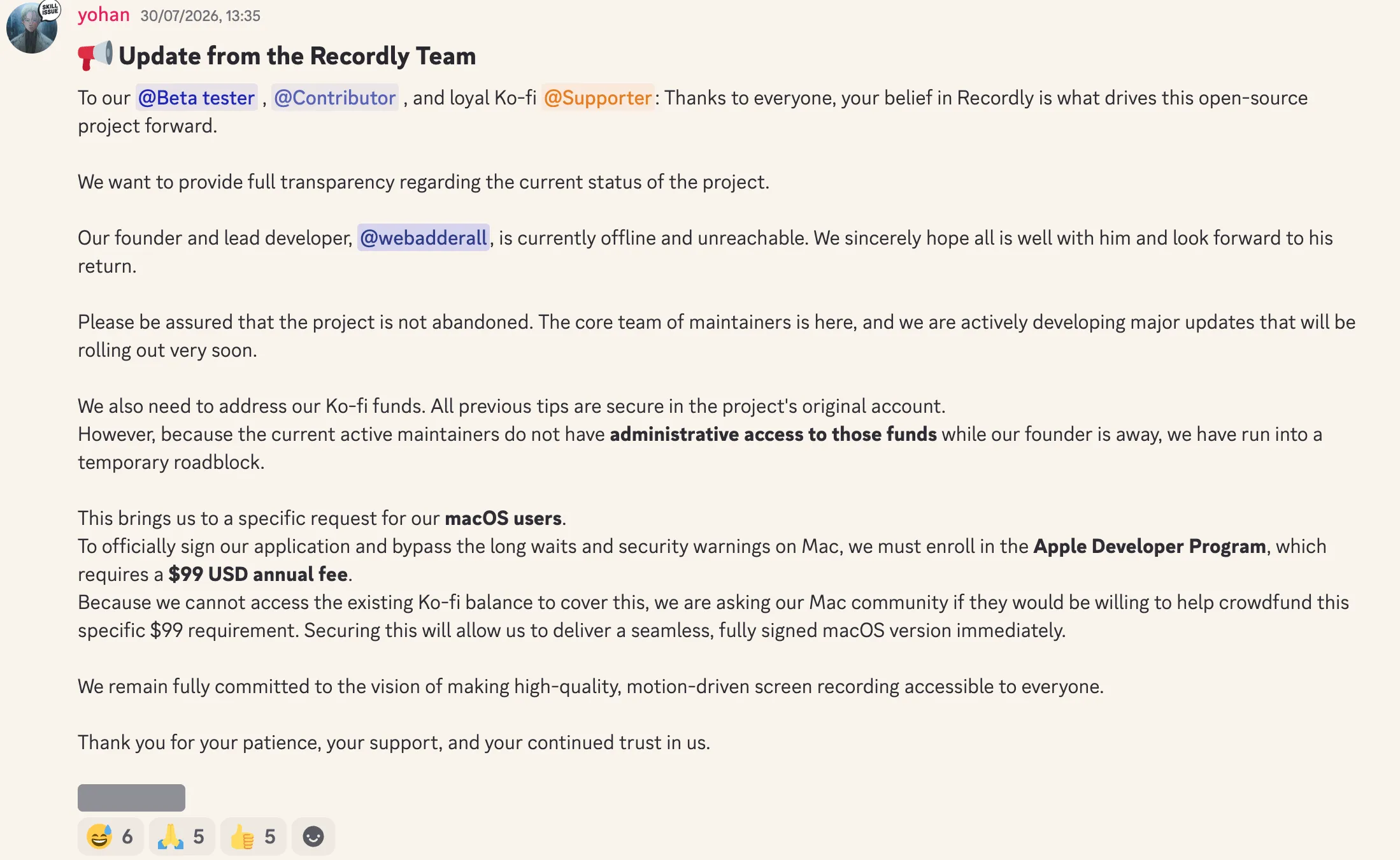
Official Update from Recordly Maintainers:
"Our founder and lead developer, @webadderall, is currently offline and unreachable. We sincerely hope all is well with him and look forward to his return...
We also need to address our Ko-fi funds. All previous tips are secure in the project's original account. However, because the current active maintainers do not have administrative access to those funds while our founder is away, we have run into a temporary roadblock.
This brings us to a specific request for our macOS users. To officially sign our application and bypass the long waits and security warnings on Mac, we must enroll in the Apple Developer Program, which requires a $99 USD annual fee. Because we cannot access the existing Ko-fi balance to cover this, we are asking our Mac community if they would be willing to help crowdfund this specific $99 requirement."
Because the sole creator went offline and donation funds are inaccessible, Recordly cannot pay Apple's annual developer fee. As a result:
- Builds are unsigned: Launching Recordly triggers macOS Gatekeeper security blocks ("Recordly cannot be opened because Apple cannot check it for malicious software").
- Stability is compromised: Unmerged pull requests and unvetted AI-generated "vibe coding" contributions have left open bugs including failed MP4 exports, memory leaks, and broken audio synchronization.
The Security Dilemma: Why You Cannot Trust Critical Software to "Just Anyone"
Many creators treat screen recording tools like simple screenshot utilities. In reality, a screen recorder is one of the most privileged, high-risk pieces of software you can run on your computer.
To function on your Mac, Recordly demands three deep system permissions:
- Screen Recording: Real-time read access to every pixel displayed across all monitors.
- Accessibility: Global monitoring of every mouse click, cursor coordinate, and keystroke.
- System Audio: Unrestricted interception of audio output and private conference calls.
During an average workday, your screen displays proprietary code repositories, internal Slack messages, customer records, Stripe financial dashboards, and confidential passwords. Granting an unsigned application assembled by an unreachable anonymous developer unrestricted visual and keyboard access to your system is an immense operational and security hazard.
In security engineering, this represents an acute Bus Factor of 1 paired with an unverified dependency supply chain. If an unmaintained repository suffers a compromised npm package or an unreviewed contribution, that unsigned tool can silently become a persistent surveillance threat.
Professional business communication and engineering demonstrations require software backed by an accountable commercial entity, verified Apple code-signing, and rigorous engineering standards.
What ScreenKite is
ScreenKite is a dedicated commercial screen recorder and video editing studio engineered specifically for macOS.
ScreenKite is fully enrolled in the Apple Developer Program, cryptographically signed, and notarized by Apple. It launches cleanly on any Mac without terminal bypasses or Gatekeeper warnings.
A 1-minute 4K video renders and exports quickly with ScreenKite, lightning fast in our tests and in user feedback.
Key capabilities include:
- Native Auto-Zoom: Anticipates clicks and smooths jittery trackpad movements into fluid cinematic motion.
- Transcription Cut: Transcribes audio with built-in transcription. Delete an awkward sentence or filler word from the transcript text, and the underlying video and audio are trimmed automatically.
- Agent AI Editing: Execute complex trims, zooms, and captioning via natural language prompts using Claude Code, ChatGPT Codex, Antigravity, Grok Build, or Kimi.
- Integrated Timeline Studio: A complete non-linear editor (comparable to CapCut and Final Cut Pro) built directly into the recording workflow.
- Strict Privacy: Local-first storage with zero cloud uploads and zero background daemons. When you quit ScreenKite, it stops completely.
- One-Time Purchase: Transparent commercial pricing with no monthly subscriptions and no seat fees.
Any downsides? The only downside is there's almost no downside. We're video creators ourselves, so we know exactly what you need.
ScreenKite runs natively on macOS and ships a native Windows Beta. Creators and teams choose it for fast local exports and timeline editing with the AI agent they already use: Claude Code, ChatGPT Codex, Antigravity, Grok Build or Kimi. Describe the cut, and the agent does the trims.
Feature by Feature Comparison
| Feature / Metric | ScreenKite | Recordly (Sept 2026) |
|---|---|---|
| Gatekeeper Compliance | Instant launch (Apple Notarized) | Blocked (Requires security bypass) |
| Auto-Zoom Quality | Cinematic smoothing | Basic (Jerky, frequent crashes) |
| Transcription Cut | Yes (built-in transcription) | No |
| Agent AI Video Editing | Yes (Claude Code / Codex / Antigravity / Grok Build / Kimi) | No |
| Full Timeline Editor | Yes (Built-in FCP/CapCut class) | Basic drag-and-drop |
| 4K Export Speed | Lightning fast in our tests and in user feedback | Sluggish / Frequent render failures |
| Background Processes | None (Quits completely) | None |
| Cloud Dependency | None (100% local-first) | None |
| Licensing Model | One-time purchase | Crowdfunding $99 on Discord |
Why Recordly Cannot Replace a Commercial Workflow
While Recordly deserves recognition as an ambitious open-source experiment, it is simply not viable for professional daily production:
- You cannot risk export crashes: Finishing a 20-minute product walkthrough only to have the app freeze at 95% export destroys productivity.
- You cannot normalize Gatekeeper warnings: In professional environments, bypassing system security with terminal commands violates IT policies and exposes company assets.
- You need a video editor, not just a recorder: Screen Studio and Recordly only handle capture. ScreenKite includes a complete multi-track editor, saving you the expense of a separate editing subscription.
Also read
- Best Recordly Alternatives in September 2026: Why Users Are Switching
- ScreenKite vs ScreenCharm: Why Native Beats Electron for Screen Recording
- ScreenKite vs OpenScreen: Native macOS Recorder vs Open-Source Electron App
- ScreenKite vs Kap: Native Recorder vs Open-Source GIF Tool
- Native vs Electron Screen Recorders: What It Means for Your Recordings
Conclusion
Recordly began with a compelling vision, but its August/September 2026 operational breakdown demonstrates why critical system utilities cannot rely on abandoned hobby projects. When software requires permission to observe your entire screen and keyboard, trusting an unsigned binary whose sole author has vanished is an unacceptable gamble.
Your presentations, tutorials, and demos represent your business and your reputation. You need a dedicated tool that opens cleanly, exports quickly, and protects your confidential data.
With a native Mac app, Apple code signing, transcription-based cutting, and integrated timeline editing, ScreenKite is the reliable, professional choice for Mac creators.
Download ScreenKite for Mac → · Explore ScreenKite Enterprise →
Founder of ScreenKite. Mike records product demos and lessons on a Mac, and builds the recorder and editor he wanted for that work.
www.screenkite.comRelated articles
Recordly Stars vs Maturity: Why Screen Recording Needs a Serious Product
Recordly has about 28.5k GitHub stars, but public maintainer posts and a thick issue backlog show school interruptions and export, audio, and permission failures. Stars are not maturity. ScreenKite is the native Mac product for demos that ship.
Best Recordly Alternatives in September 2026: Why Users Are Switching
Recordly is stalled in September 2026: its lead developer is unreachable, donated funds are locked, and Mac builds are unsigned. Why trust matters for screen recording permissions, and how ScreenKite, Cap, OpenScreen, and OBS compare.
Best Recordly Alternatives in August 2026: Why Users Are Switching
Recordly is facing maintenance lockouts and unsigned Mac builds in August 2026. Here is why users are switching to ScreenKite and how the alternatives compare.