
2026년 8월 최고의 Recordly 대안: 사용자들이 전환하는 이유
Recordly는 2026년 8월 현재 메인테이너 접속 차단 및 서명되지 않은 Mac 빌드 문제에 직면해 있습니다. 사용자들이 ScreenKite로 전환하는 이유와 대안들을 비교합니다.
2026년 8월 최고의 Recordly 대안: 사용자들이 전환하는 이유
Recordly는 처음에 Screen Studio에 대한 무료 오픈 소스 대안으로 GitHub에서 큰 기대를 모았습니다. AGPL 3.0 라이선스 기반으로 자동 줌, 커서 스무딩, 프레임 스타일링을 제공하겠다고 약속했습니다.
하지만 2026년 8월 현재 Recordly는 프로젝트 거버넌스 붕괴, 후원금 계좌 동결, 코드 서명이 안 된 macOS 빌드, 방치된 안정성 버그로 인해 실제 업무에 사용하기 어려운 상태입니다.
보안 경고나 내보내기 오류 없이 바로 쓸 수 있는 신뢰할 만한 화면 녹화기를 찾고 계시다면, Recordly가 정체된 이유와 2026년 8월 ScreenKite가 Mac 사용자에게 최고의 선택지인 이유를 확인하세요.
2026년 9월 최신 업데이트: Recordly 창립자 연락 두절이 지속되고 있으며 Mac 빌드는 여전히 코드 미서명 상태입니다. Discord 공식 공지 증거를 포함한 최신 심층 분석: 2026년 9월 최고의 Recordly 대체 프로그램 →
2026년 8월 Recordly가 실사용에 적합하지 않은 이유
2026년 8월, Recordly의 활성 메인테이너들은 Discord 커뮤니티에 공식 공지를 올려 심각한 운영 장애 상황을 설명했습니다.
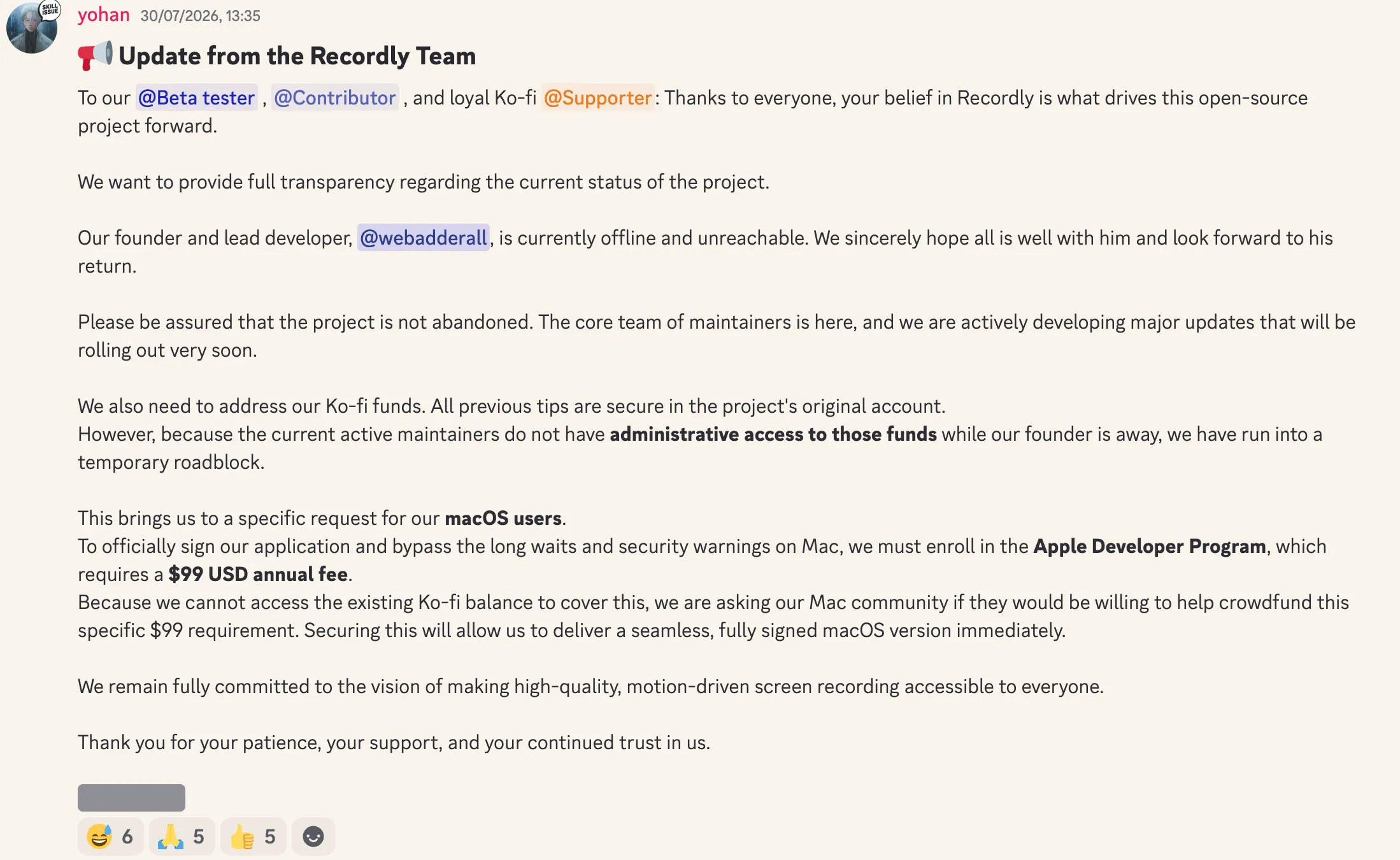
Recordly 메인테이너 공식 발표 (2026년 8월):
"현재 창립자이자 리드 개발자가 오프라인 상태이며 연락이 닿지 않고 있습니다... 창립자가 부재한 동안 현재 활동 중인 메인테이너들은 [Ko-fi] 후원금 계좌의 관리자 권한이 없어 일시적인 난관에 봉착했습니다."
"앱에 공식적으로 코드 서명을 적용하고 Mac의 긴 대기 시간과 보안 경고를 우회하려면 연간 $99 USD의 Apple Developer Program에 등록해야 합니다. 하지만 이를 충당할 기존 Ko-fi 잔액에 접근할 수 없어, Mac 커뮤니티에 이 $99 모금에 동참해 주실 수 있는지 요청드립니다."
Recordly의 신뢰성을 떨어뜨리는 핵심 문제는 다음과 같습니다.
- 코드 서명이 안 된 macOS 앱 바이너리: 메인테이너들이 Ko-fi 후원금에 접근할 수 없어 Apple의 연간 개발자 프로그램 비용을 지불하지 못하면서, 앱이 서명되지 않은 채 배포되고 있습니다. macOS에서 실행하면 Gatekeeper 보안 차단 및 확인되지 않은 개발자 경고가 발생합니다.
- 창립자의 잠적 및 후원금 동결: 창립자(
webadderall)가 오프라인 상태로 연락이 두절되면서 프로젝트 후원 계좌의 모든 관리 권한이 잠겼습니다. - GitHub 상의 바이브 코딩(Vibe-coding) 안정성 문제: 지속적인 코드 리뷰나 테스트 파이프라인 없이 AI 기반의 빠른 코드 생성에만 의존한 결과, GitHub 이슈에는 무한 충돌, MP4 내보내기 실패, 메모리 누수, 오디오 싱크 어긋남 등의 버그 제보가 넘쳐나고 있습니다.
고객용 데모, 튜토리얼, 제품 시연을 녹화할 때 제대로 내보내지 못하거나 macOS 보안 검사를 통과하지 못하는 소프트웨어를 쓰는 것은 큰 업무 차질을 빚습니다.
최고의 대안: ScreenKite (세계 최고의 Mac 네이티브 화면 녹화기 겸 비디오 편집기)
ScreenKite는 Recordly에서 전환하려는 Mac 사용자에게 의심의 여지 없는 최고의 선택입니다. 100% 네이티브 macOS 앱인 ScreenKite는 세계에서 가장 가볍고 빠르며 강력한 화면 녹화 및 영상 편집 스위트입니다. Apple의 공식 코드 서명과 공증(Notarization)을 완료하여 Gatekeeper 경고 없이 즉시 실행됩니다.
화면만 단순 캡처하고 결국 Final Cut Pro나 CapCut 같은 별도 편집 프로그램을 사서 써야 하는 미완성 도구들과 달리, ScreenKite는 전문 멀티트랙 비디오 편집 스튜디오를 기본 내장하고 있습니다. 뿐만 아니라 Claude Code, ChatGPT Codex, Antigravity, Grok Build, Kimi 같은 AI 에이전트와 연동되어 자연어 프롬프트만으로 비디오 편집을 자동으로 완수합니다.
ScreenKite의 내보내기는 테스트에서도 사용자 피드백에서도 번개처럼 빠릅니다.
핵심 기능:
- 가볍고 빠름: 100% 네이티브 macOS 앱으로, 내보내기는 테스트에서도 사용자 피드백에서도 번개처럼 빠릅니다. 무거운 Electron이 없습니다.
- 완전한 비디오 편집 스튜디오 내장: 컷 편집, 분할, 다이내믹 오토 줌, 레이아웃 스타일링, 자막 편집이 가능한 멀티트랙 타임라인. 별도의 영상 편집기를 추가 구매할 필요가 없습니다.
- 에이전트 기반 AI 자동 편집: 자연어 명령만 입력하면 Claude Code, ChatGPT Codex, Antigravity, Grok Build, Kimi가 컷 편집, 줌 효과, 자막 작업을 자동으로 처리합니다.
- 텍스트 대본 컷 편집: 로컬에서 생성된 대본 텍스트에서 불필요한 단어나 침묵을 지우기만 하면 영상의 해당 구간이 밀리초 단위로 매끄럽게 잘려 나갑니다.
- 공식 서명 및 공증 완료: 공식 Apple Developer Program에 등록되어 Mac에서 Gatekeeper 경고가 전혀 발생하지 않습니다.
- 시스템 오디오 캡처: 타사 가상 오디오 드라이버를 깔 필요 없이 네이티브 macOS 캡처오디오 라우팅으로 안정적인 사운드를 녹음합니다.
- 평생 소장 1회 구매: 투명한 영구 라이선스 상용 소프트웨어. 월간 구독료와 불필요한 클라우드 종속이 전혀 없습니다. Pro는 무료 내보내기의 워터마크를 제거합니다.
단점은요? 단점이라면 단점이 거의 없다는 것입니다. 저희가 직접 영상을 만드는 크리에이터라서 사용자에게 무엇이 필요한지 가장 잘 압니다.
ScreenKite는 macOS에서 네이티브로 실행되며 네이티브 Windows Beta도 제공합니다. 테스트에서도 사용자 피드백에서도 번개처럼 빠르며, 이미 쓰고 있는 AI 에이전트(Claude Code, ChatGPT Codex, Antigravity, Grok Build, Kimi)로 타임라인에서 편집할 수 있습니다. 원하는 컷을 말하면 에이전트가 다듬어 줍니다.
기타 오픈 소스 대안: Cap.so
다른 오픈 소스 프로젝트를 꼭 찾고 있는 사용자라면 가벼운 오픈 소스 화면 녹화기인 Cap.so를 고려할 수 있습니다.
하지만 Cap.so는 전문 제작 도구에 비해 기능이 제한적입니다. 개발 방향이 실제 사용자의 작업 워크플로 문제를 해결하기보다는 개발자 기술 실험에 주로 맞춰져 있습니다. 그 결과 자동 커서 줌, 텍스트 기반 비디오 편집, AI 후반 작업 컷 같은 핵심 기능이 부족합니다.
Cap.so가 흥미로운 오픈 소스 기술 프로젝트이긴 하지만, 수동 편집 없이 완성도 높은 제품 데모를 만들고자 하는 사용자에게는 기능적 한계가 뚜렷합니다.
기능 및 신뢰성 비교
| 기능 / 지표 | ScreenKite | Recordly (2026년 8월) | Cap.so |
|---|---|---|---|
| macOS 보안 | 서명 및 공증 완료 | 미서명 (Gatekeeper 차단) | 서명 완료 / 웹 기반 |
| 유지보수 상태 | 전담팀의 활발한 개발 | 중단됨 / 후원금 동결 | 실험용 샌드박스로 활발 |
| 자동 줌 | 지원 | 지원 (버그/충돌 잦음) | 미지원 |
| 내보내기 가속 | 테스트에서도 사용자 피드백에서도 번개처럼 빠름 | 불안정 / 충돌 발생 | 보통 |
| 텍스트 대본 컷 편집 | 지원 | 미지원 | 미지원 |
| AI 비디오 편집 | 지원 (Claude Code / ChatGPT Codex / Antigravity / Grok Build / Kimi) | 미지원 | 미지원 |
| 완전한 비디오 편집기 | 지원 (멀티트랙 스튜디오 내장) | 기초적인 타임라인만 제공 | 미지원 |
| 가격 | 평생 1회 구매 | 무료 (미서명) | 무료 / 유료 플랜 |
| 개발 초점 | 전문가용 제품 데모 및 최고 속도 | 오픈 소스 프로토타입 | 기술 실험 |
관련 글 보기
- ScreenKite vs Recordly: 네이티브 macOS 녹화기 vs 오픈 소스 대안
- ScreenKite vs ScreenCharm: 화면 녹화에서 네이티브가 Electron을 이기는 이유
- ScreenKite vs OpenScreen: 네이티브 macOS 녹화기 vs 오픈 소스 Electron 앱
- ScreenKite vs Kap: 네이티브 녹화기 vs 오픈 소스 GIF 도구
- 네이티브 vs Electron 화면 녹화 도구: 내 녹화에 어떤 의미가 있을까
결론
Recordly의 2026년 8월 리더십 부재, 후원금 동결, 미서명 Mac 빌드, 방치된 GitHub 충돌 이슈는 일상 업무에서 유지보수되지 않는 취미용 소프트웨어에 의존할 때의 위험성을 보여줍니다.
macOS 환경에서 가볍고 강력한 녹화 및 편집 경험—빠른 내보내기, 내장 멀티트랙 비디오 스튜디오, 사용자를 대신해 작업하는 AI 에이전트—을 원하신다면 ScreenKite가 훌륭한 선택입니다.
ScreenKite 창업자. Mike는 Mac에서 제품 데모와 강의를 녹화하며, 그 작업에 필요했던 녹화 도구와 편집기를 만듭니다.
www.screenkite.comRelated articles
ScreenKite vs Recordly: 네이티브 Mac 녹화기와 오픈소스 크로스 플랫폼 대안 비교
2026년 9월 최신 비교: ScreenKite vs Recordly.
2026년 Mac용 Screen Studio 대안 추천: 5가지 도구 비교
2026년 Mac용 Screen Studio 대안을 비교합니다. ScreenKite, Screen Charm, Loom, OBS Studio, Camtasia를 살펴보고, ScreenKite가 내보내기 속도, AI 편집, 가성비에서 돋보이는 이유를 알아보세요.
2026년 Mac용 최고의 무료 화면 녹화 프로그램 7선
2026년 Mac용 모든 무료 화면 녹화 프로그램을 솔직하게 비교합니다. 각 도구의 장단점과 워크플로에 맞는 최적의 선택지를 확인하세요.